Clicker Heroes occasionally releases promotional codes that players can redeem for in-game rewards, commonly including rubies. Depending on how a code is shared, you may receive either a clickable redemption link or a standalone code that needs to be entered manually.
The fastest option is usually an official Clicker Heroes redemption link because the code is already included in the URL. However, manual redemption is still useful when you receive only the code itself or when a direct link does not complete the process.
This guide explains both methods and shows what to check when a Clicker Heroes code or redemption link does not work.
Quick Guide: Two Ways to Redeem a Clicker Heroes Code
| Method | Use it when | What to do |
|---|---|---|
| Direct redemption link |
You received an official clickerheroes.com/redeem link
|
Open the complete link and follow the instructions |
| Manual redemption | You received only the code text | Use the appropriate redemption method for your platform |
Recommendation: If the code was shared as an official Clicker Heroes link, try the direct-link method first. If you only have the letters and numbers, use the manual method.
Method 1: Redeem a Clicker Heroes Code Using a Direct Link
Some Clicker Heroes promotions provide a complete redemption URL instead of only a standalone code.
For example:
https://clickerheroes.com/redeem?code=ABC-123
In this URL:
https://clickerheroes.com/redeemopens the official redemption page.?code=tells the page that a redemption code is included.ABC-123is an example code used to demonstrate the URL structure.
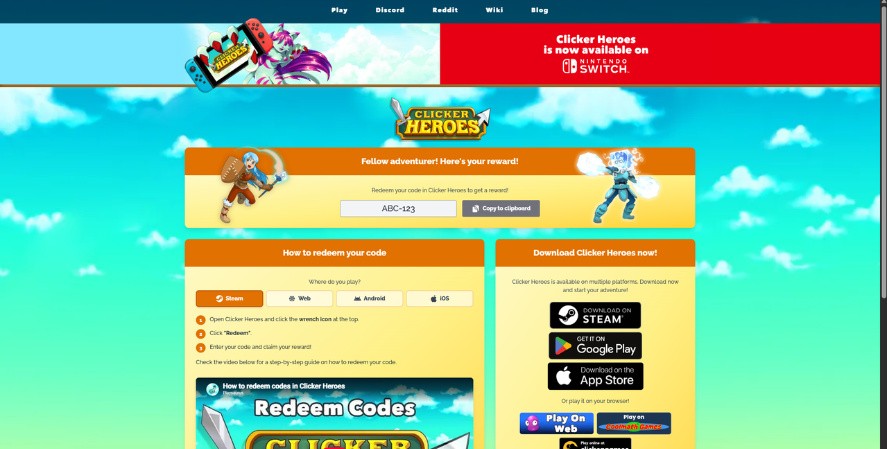
Note: ABC-123 is a tutorial placeholder and should not be treated as an active reward code.
Step 1: Open the Complete Redemption Link
Click the official redemption link or copy and paste the entire URL into your browser.
Make sure you:
- Keep everything after
?code=. - Confirm the domain is
clickerheroes.com. - Avoid links from unfamiliar or misspelled domains.
- Never enter account passwords on unofficial code websites.
Step 2: Confirm That Your Code Appears
The Clicker Heroes redemption page automatically displays the code included in the URL.
You should see your code near the top of the page along with a Copy to clipboard button.
If you need to enter the code manually later, select Copy to clipboard to copy it.
Step 3: Choose Your Platform
Under How to redeem your code, select the platform you use:
- Steam
- Web
- Android
- iOS
The page will display instructions specific to that platform.
If you’re unsure which versions of the game are available, see our guide to where to play Clicker Heroes.
Step 4: Follow the Platform Instructions
For example, when Steam is selected, the redemption page currently instructs players to:
- Open Clicker Heroes and click the wrench icon at the top.
- Click Redeem.
- Enter the code and claim the reward.
The actual current in-game interface includes the Rewards Hub, so the more detailed Desktop/Steam tutorial later in this guide shows the complete current path.
Step 5: Enter or Copy the Code
If the selected platform requires manual entry, use the code shown on the redemption page.
You can select Copy to clipboard to reduce typing errors.
Then follow the platform-specific instructions below to complete the redemption.
Step 6: Check Your Reward
After the code has been accepted, open or return to Clicker Heroes and check the relevant balance or reward.
The reward depends on the promotion, so not every code will necessarily provide the same item or amount.
Direct-Link Video Tutorial
Watch the short tutorial below to see how the Clicker Heroes redemption process works.
Written summary: Open the official redemption link, follow the instructions shown for your platform, complete the redemption, and then check Clicker Heroes for the reward.
Method 2: Enter a Clicker Heroes Code Manually
Manual redemption is useful when you receive only a standalone code instead of a complete redemption link.
The redemption process differs slightly between Desktop/Steam, Android, and iOS, so follow the instructions for your platform.
How to Redeem Clicker Heroes Codes on Desktop or Steam
Desktop and Steam players can redeem Clicker Heroes codes directly inside the game.
Step 1: Launch Clicker Heroes
Open Clicker Heroes and wait for the main game screen to load completely.
Step 2: Open the Options Menu
Click the wrench icon in the upper-right corner of the game screen.
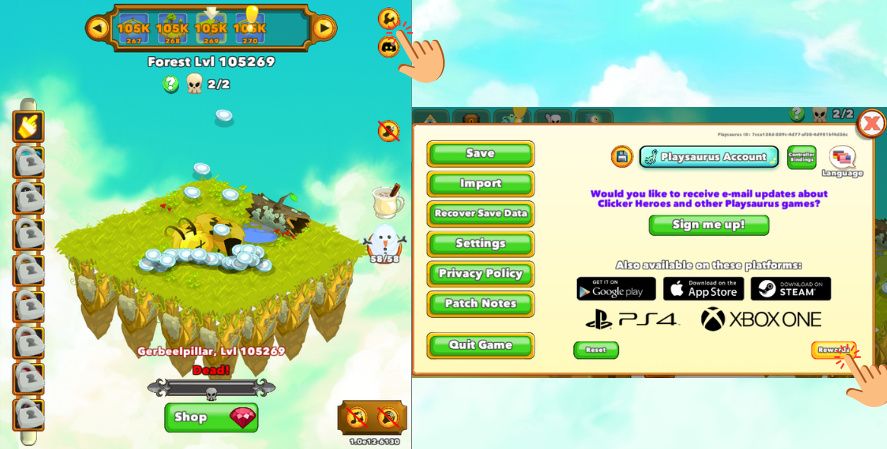
This opens the Clicker Heroes Options menu.
Step 3: Select Rewards
Click Rewards near the bottom-right corner of the Options menu.
Step 4: Select Redeem Code
The Rewards Hub will open.
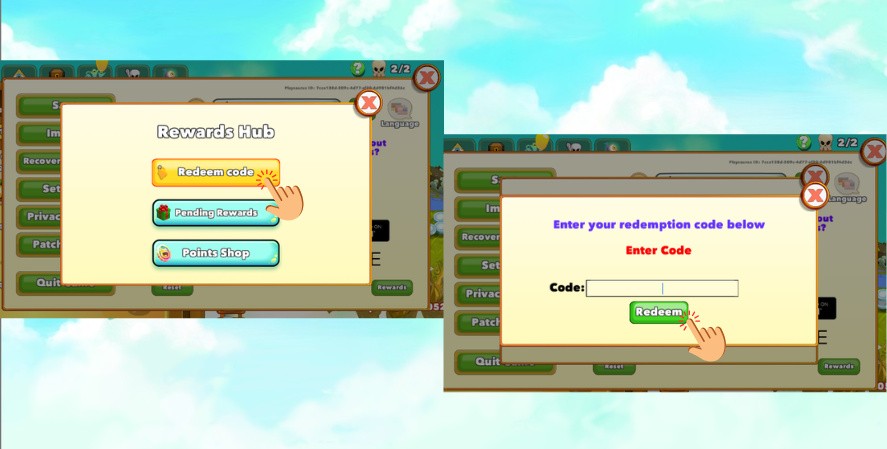
Click Redeem code.
Step 5: Enter Your Code
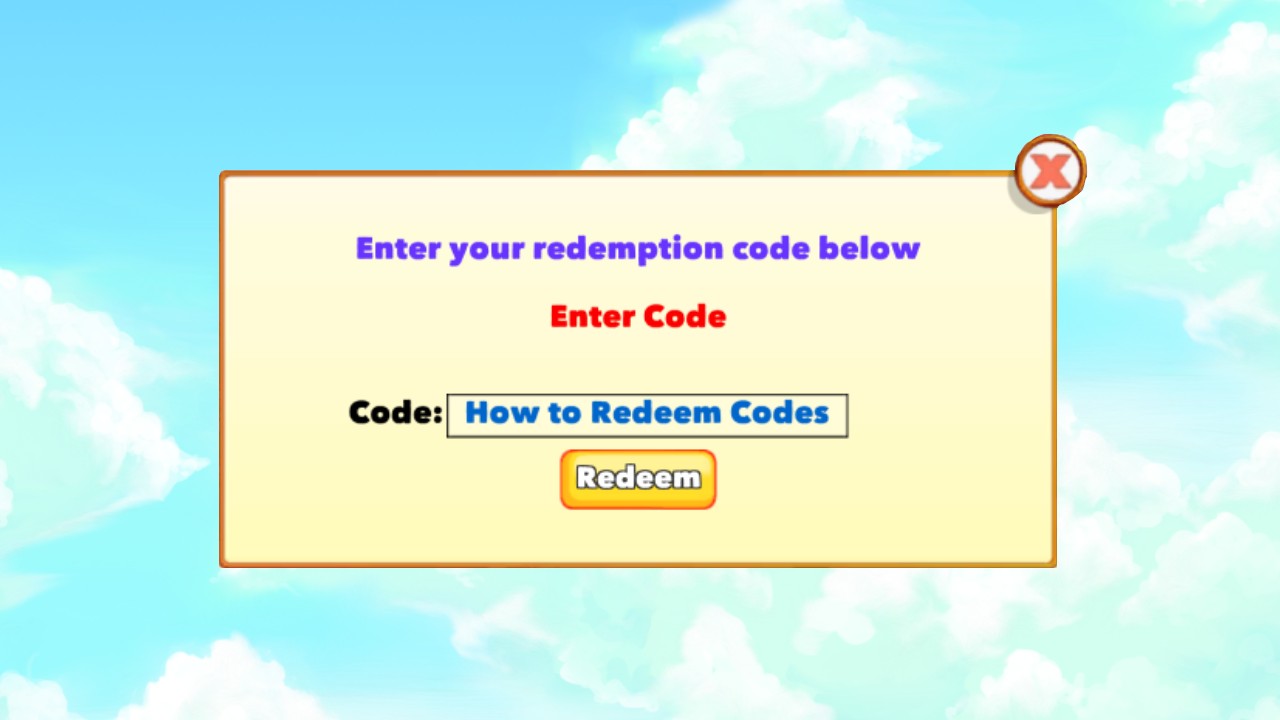
Enter or paste your code into the Code field.
Make sure you enter the code exactly as it was provided, including any hyphens or other characters.
Step 6: Click Redeem
Click the green Redeem button.
If the code is valid, Clicker Heroes will process the redemption and display the appropriate success or reward message.
How to Redeem Clicker Heroes Codes on Android
Android players can currently redeem Clicker Heroes codes directly inside the game.
Step 1: Launch Clicker Heroes
Open Clicker Heroes and wait for the main game screen to load completely.
Step 2: Open the Options Menu
Tap the wrench icon in the upper-left corner of the screen.
This opens the Clicker Heroes Options menu.
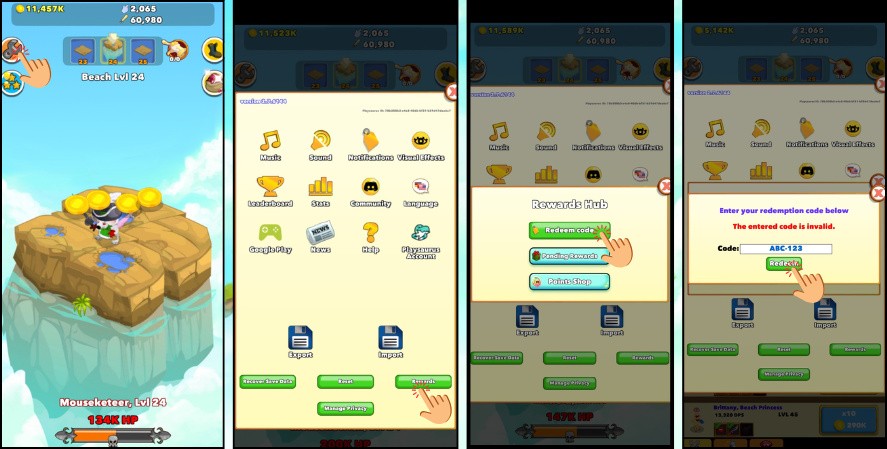
Step 3: Tap Rewards
Scroll to the bottom of the Options menu and tap Rewards.
Step 4: Select Redeem Code
The Rewards Hub will appear.
Tap Redeem code.
Step 5: Enter Your Code
Type or paste the code into the Code field.
For fewer errors:
- Copy and paste the code whenever possible.
- Do not add spaces before or after it.
- Keep any hyphens or other symbols.
- Check similar-looking characters carefully.
- Enter the code exactly as it was provided.
Step 6: Tap Redeem
Tap the green Redeem button.
If the code is not accepted, the game may display:
“The entered code is invalid.”
If the code is accepted, the game displays “Success!” and proceeds to the reward confirmation.
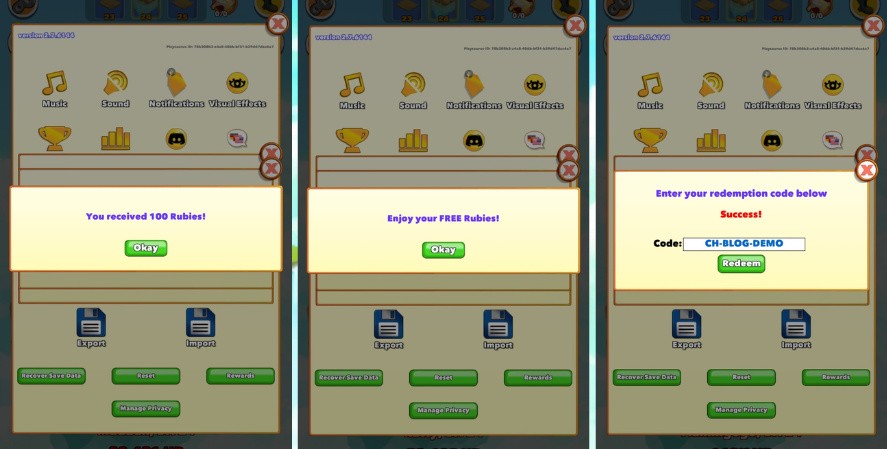
Step 7: Confirm Your Reward
After successful redemption, Clicker Heroes displays the reward associated with the code.
For example, during our test, the game displayed:
“You received 100 Rubies!”
Tap Okay to close the confirmation.
This example demonstrates the test reward only. Other promotional codes may provide different rewards.
How to Redeem Clicker Heroes Codes on iPhone or iPad
Code redemption works differently on iOS.
If you attempt to redeem a code inside the Clicker Heroes iOS app, the game currently displays:
“Per Apple’s instructions, redeeming codes has been disabled on iOS.”
However, this does not mean iPhone and iPad players cannot redeem Clicker Heroes codes at all.
Instead, iOS players can use the Playsaurus website and a Playsaurus account.
Step 1: Open the Playsaurus Website
Open Safari or another web browser on your iPhone or iPad and visit the Playsaurus website.
Step 2: Log In to Your Playsaurus Account
Open the site menu and tap Login.
Enter the email address and password associated with your Playsaurus account.
If you do not have an account yet, select Register and create one.
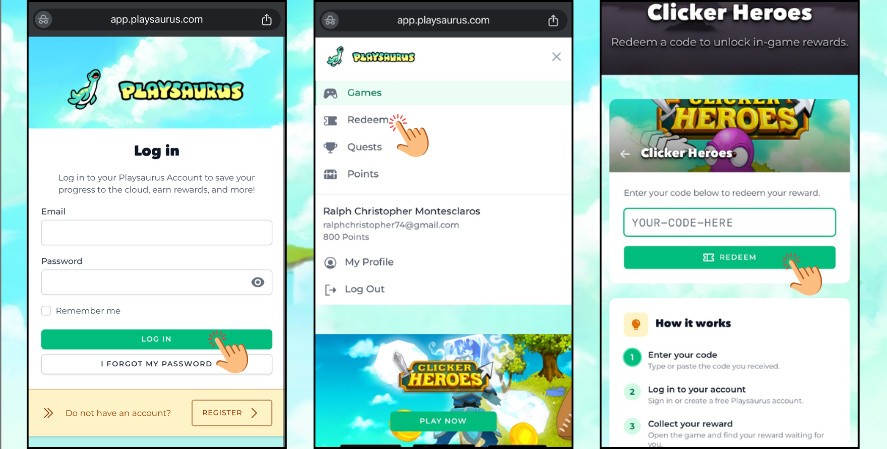
Step 3: Open the Redeem Section
After signing in, open the Playsaurus menu.
Select Redeem.
Step 4: Select Clicker Heroes
The redemption page displays supported Playsaurus games.
Select Clicker Heroes.
Step 5: Enter Your Clicker Heroes Code
The Clicker Heroes redemption page displays a code field and a REDEEM button.
Type or paste your code into the field.
The page summarizes the process as:
- Enter your code
- Log in to your account
- Collect your reward
Step 6: Select Redeem
After checking the code, tap REDEEM.
Once the code has been accepted, open Clicker Heroes and check for the reward associated with the promotion.
Why Can’t I Enter a Code Inside Clicker Heroes on iOS?
The current iOS version displays the following message when in-game redemption is attempted:
“Per Apple’s instructions, redeeming codes has been disabled on iOS.”
Therefore, use the Playsaurus website method described above instead.
Clicker Heroes Code Redemption by Platform
| Platform | In-game redemption | Current method |
|---|---|---|
| Desktop / Steam | Yes | Wrench → Rewards → Redeem code |
| Android | Yes | Wrench → Rewards → Redeem code |
| iOS | No | Playsaurus website → Log in → Redeem → Clicker Heroes |
Direct Redemption Link vs. Manual Code Entry
A redemption link and a standalone code contain the same basic information in different formats.
A direct link includes the code in the URL:
https://clickerheroes.com/redeem?code=ABC-123
A standalone code contains only the code itself:
ABC-123
The direct-link method can reduce typing errors because the code is already attached to the URL.
If you receive only a standalone code, use the appropriate manual redemption method for your platform.
Individual promotions may have expiration dates, redemption limits, or platform requirements.
Why Is My Clicker Heroes Code Not Working?
The Code Was Entered Incorrectly
Check for:
- Missing or extra characters
- Spaces before or after the code
- Missing hyphens or symbols
- Incorrect capitalization
- Similar-looking characters such as
0,O,1,I, andL
Whenever possible, copy and paste the code directly from its official source.
The Code Has Expired
Some Clicker Heroes codes are connected to limited-time promotions.
A code found in an older blog post or announcement may therefore no longer be active.
Check the original promotion for an expiration date before trying the code again.
The Code Was Already Redeemed
Some promotions may limit repeated claims.
The exact redemption rule depends on the individual code, so avoid assuming that every Clicker Heroes code can only be redeemed once per account.
The Direct Link Opens but Nothing Happens
If a direct redemption link does not work:
- Make sure you opened the complete URL.
- Do not remove the code after
?code=. - Confirm that JavaScript is enabled in your browser.
- Try another supported browser.
- Make sure Clicker Heroes is updated.
- Try the appropriate manual redemption method instead.
Clicker Heroes Is Out of Date
Update Clicker Heroes to the latest available version and restart the game before trying the code again.
The Reward Does Not Appear
If the code was accepted but you cannot find the reward:
- Close and reopen the relevant game menu.
- Wait briefly for the game to update.
- Restart Clicker Heroes once.
- Check whether the relevant balance or feature changed.
- Confirm that the code displayed a successful redemption message.
Code Redemption Is Disabled Inside the iOS App
In-game code redemption is currently disabled on iOS.
Instead of entering the code inside Clicker Heroes, log in to your Playsaurus account through the Playsaurus website and use its Redeem section.
The Code Came From an Unofficial Source
Verify promotional codes through official Clicker Heroes or Playsaurus channels whenever possible.
Never:
- Download suspicious files or browser extensions to obtain a code.
- Complete questionable surveys promising free codes.
- Share your account password.
- Enter payment details solely to obtain a supposedly free code.
Where to Find Official Clicker Heroes Codes
For legitimate Clicker Heroes codes, prioritize:
- Official Clicker Heroes redeem code posts
- Official Clicker Heroes Discord
- Official Clicker Heroes social accounts
- Official Steam announcements
- Official Playsaurus communications
- In-game announcements and events
For an example of an official promotion, see our Clicker Heroes redeem code post from October 2025.
If you find a code through a community website or discussion, verify it against an official source before using it.
Frequently Asked Questions
What does a Clicker Heroes redemption link look like?
An official Clicker Heroes redemption link uses the clickerheroes.com domain and may include a code after ?code=.
For example:
https://clickerheroes.com/redeem?code=ABC-123
Is ABC-123 an active Clicker Heroes code?
ABC-123 is a tutorial placeholder used to demonstrate the redemption URL structure. Do not treat it as an active Clicker Heroes code unless it is officially confirmed.
Can I manually enter a code from a redemption link?
Yes, if manual redemption is supported on your platform. Desktop/Steam and Android players can enter the code through the in-game Rewards Hub. On iOS, use the Playsaurus website instead of entering the code inside the app.
Can I redeem the same code more than once?
It depends on the promotion.
Some codes may restrict repeated claims, but you should not assume that every Clicker Heroes code has the same redemption limit.
Are Clicker Heroes codes case-sensitive?
Until the current behavior is officially confirmed, enter codes exactly as published.
Copying and pasting the code is the safest way to preserve capitalization, hyphens, and other characters.
Do Clicker Heroes codes expire?
Some Clicker Heroes codes are time-limited.
Check the original promotion for an expiration date and redeem limited-time codes promptly.
What rewards can Clicker Heroes codes provide?
Rewards depend on the individual promotion.
Rubies are one type of reward that can be distributed through Clicker Heroes codes, but you should not assume that every code provides rubies.
Can Clicker Heroes codes be redeemed on Android?
Yes. In the Android version we tested, open the wrench icon, select Rewards, open Redeem code, enter the code, and tap Redeem.
Can Clicker Heroes codes be redeemed on iPhone or iPad?
Yes, but not directly inside the iOS app.
In-game code redemption is disabled on iOS. Instead, log in to your Playsaurus account through the Playsaurus website, open Redeem, select Clicker Heroes, and enter your code there.
What should I do if the redemption link does not work?
First, make sure you opened the complete link and did not remove the portion after ?code=.
If the direct method still does not work, Desktop/Steam and Android players can enter the code through the in-game Rewards Hub. iOS players can redeem it through the Playsaurus website.
How often are new Clicker Heroes codes released?
There is no fixed schedule for new Clicker Heroes promotional codes.
Follow official Clicker Heroes and Playsaurus channels for announcements about new codes and limited-time promotions.
Redeem Your Code and Continue Your Adventure
Clicker Heroes codes can be redeemed in different ways depending on how the code is shared and which platform you use.
When an official redemption link is provided, try the direct-link method first. If you receive only a standalone code, Android players can redeem it through the game’s Rewards Hub, while iPhone and iPad players can use the Playsaurus website.
Always enter codes exactly as published, redeem time-limited promotions promptly, and rely on official Clicker Heroes or Playsaurus sources when looking for legitimate codes.
After claiming your reward, continue your adventure with our Clicker Heroes Player’s Guide and Strategy for help with progression, heroes, Ascension, Ancients, and other core mechanics.