Playsaurus Points in Clicker Heroes give players more reasons to keep playing. You can stay active, complete quests, connect your account, and claim rewards outside the normal monster-fighting loop. For longtime fans of Clicker Heroes, this points system adds another fun layer to the game. You play, finish eligible tasks, collect points, and use them for available rewards through the Playsaurus system.
Clicker Heroes is one of the most popular names in Clicker games. It helped make the genre popular with a simple but addictive formula. You defeat monsters, earn gold, hire heroes, upgrade damage, and move through more zones. You can click enemies yourself or let your heroes keep fighting while you are away. This is what makes idle clicker games so enjoyable: steady progress, useful upgrades, and the feeling that the next goal is always close.
The Playsaurus account system expands this experience. It gives players one place to connect supported games, track quests, join events, and claim Clicker Heroes Rewards when available. Instead of only focusing on in-game progress, Playsaurus Points help connect your activity to a wider rewards program.
In this guide, you will learn what Playsaurus Points in Clicker Heroes are and how the rewards system works. You will also learn how to create and link a Playsaurus Account, how to earn points, how to redeem points, what rewards may be available, and how to fix common problems with quests, codes, and account syncing.
Playsaurus Points in Clicker Heroes are useful for players who want more value from regular play. By understanding how points, quests, and rewards work, you can make better use of every available opportunity.
What Are Playsaurus Points in Clicker Heroes?
Playsaurus Points in Clicker Heroes are part of a rewards system linked to a Playsaurus Account. They are made to reward players for taking part in eligible activities. These may include quests, events, promotions, and reward redemptions.
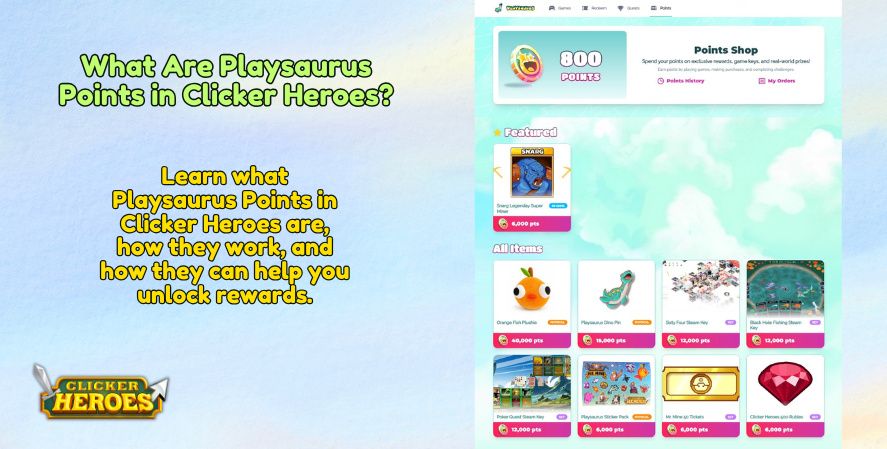
The rewards catalog, quest list, and redemption options may change over time. But the main idea is simple. Players complete certain actions, earn points, and use those points through the official rewards or redemption system when rewards are available.
For players who enjoy incremental games, Playsaurus Points add another goal to work toward. You are not only thinking about hero upgrades, ascensions, zones, and damage. You can also watch for account rewards and limited-time offers.
Note: The current Playsaurus Quests page shows website-based task cards. It does not clearly show daily, weekly, event, or gameplay-based quests. Available quests may change, so players should always check the official Playsaurus Quests page for the latest tasks.
Overview of the Playsaurus Points System
The Playsaurus Points system is best understood as an account-based reward layer. Instead of being limited to a single save file or one device, the system is generally tied to your Playsaurus Account. That makes registration and account linking important, especially if you want your eligible activity to count correctly.
The points system may include activities such as:
- Completing quests
- Participating in events
- Connecting supported games
- Engaging with promotional campaigns
- Claiming account-based opportunities
- Redeeming codes or offers when available
The phrase Playsaurus points usually refers to these account-level reward points. Players may also use similar terms like Clicker Heroes Points, game points, or reward points when discussing the system, but it is always best to check the exact terminology used on official Playsaurus pages.
How the Rewards Program Works
A typical rewards flow looks like this:
- Create or log in to a Playsaurus Account.
- Link your supported game, such as Clicker Heroes, when the option is available.
- Visit the quest or rewards section connected to your account.
- Complete eligible activities.
- Wait for the system to register your progress.
- Collect or receive points.
- Visit the Playsaurus Points Shop or official redemption area.
- Choose available rewards and redeem your balance if you qualify.
This structure is familiar to players who have used loyalty systems in other games. What makes it especially fitting for Clicker Heroes is that the game already revolves around long-term progression. You are not just playing one session and walking away. You are gradually building power, improving efficiency, and planning your next push. A points system gives that long-term engagement another purpose.
Which Games Support Playsaurus Points?
Support depends on the current Playsaurus system and official eligibility rules. Clicker Heroes is the main focus of this guide. However, Playsaurus may also connect rewards or account features to other supported games, campaigns, or community activities.
Because supported games and reward programs can change, players should check the latest details on official Playsaurus pages. This is important before making purchases, joining promotions, or expecting points from a specific game.
Still, Clicker Heroes is closely linked with Playsaurus. It is often the first game players think of when they hear about Playsaurus Points in Clicker Heroes.
Why Players Should Join
Players should join because a Playsaurus Account can make Clicker Heroes feel more rewarding. If you already play the game often, an account may help you access quests, rewards, promotions, and official updates.
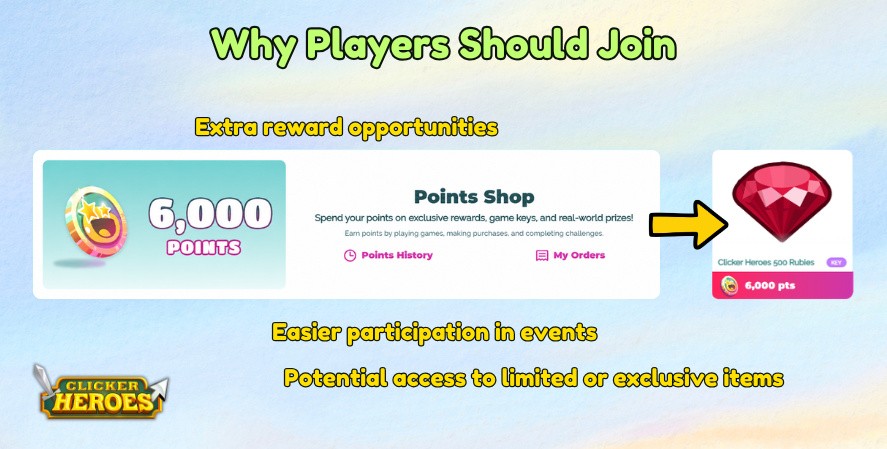
The biggest reasons to join include:
- Extra reward opportunities
- Account-based quest tracking
- Access to official campaigns
- Easier participation in events
- A better connection to the wider game community
- Potential access to limited or exclusive items
It also helps connect your account to the wider Playsaurus system. This makes it easier to complete available quest cards, claim points, and check for rewards through the official website.
How to Create a Playsaurus Account
Creating a Playsaurus Account is usually the first step toward earning and redeeming points. If you do not have an account, your qualifying actions may not be recorded or linked to any rewards you earn.
The process is typically straightforward, but players should pay attention to the email address, login method, and platform they use. A small mistake during registration or linking can later cause sync issues or missing points.
Account Registration
To register, visit the official Playsaurus account or rewards page and look for the sign-up or login option. You may be asked to provide an email address, create a password, confirm your email, or use another supported login method.
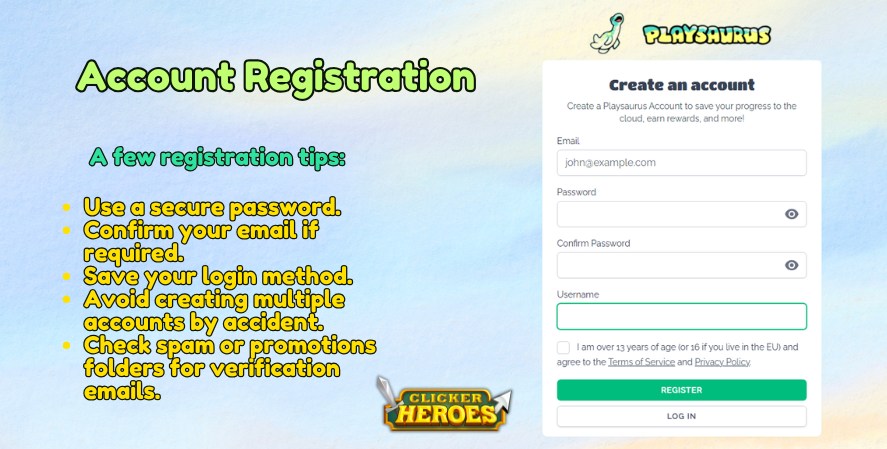
When registering, use an email address you can access easily. Reward confirmations, support responses, password resets, and redemption details may depend on that email. If you use a temporary or rarely checked address, you may miss important account notifications.
A few registration tips:
- Use a secure password.
- Confirm your email if required.
- Save your login method.
- Avoid creating multiple accounts by accident.
- Check spam or promotions folders for verification emails.
Linking Your Game
After creating your account, the next step is to link Clicker Heroes or another supported game. This step is important because it tells the rewards system which game activity belongs to your Playsaurus Account.
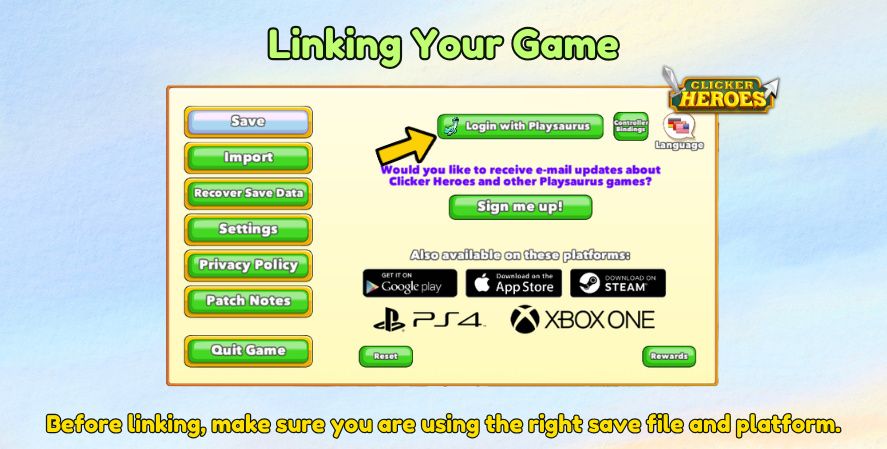
Depending on your platform, linking may work in different ways. You may need to log in through the game, enter a code, connect from your account dashboard, or follow an in-game prompt. The exact steps can vary, so follow the instructions shown in the official account area.
Before linking, make sure you are using the right save file and platform. If you have played Clicker Heroes on more than one device or store, check which version you want to connect.
Supported Platforms
Clicker Heroes has been available on several platforms over the years. These include browser, PC, mobile, and console versions. However, not every platform supports every account or rewards feature.
Before you assume your activity will generate points, check whether your platform supports the current Playsaurus Account features. This is especially important if you play on more than one device or use an older version of the game.
Players who enjoy clicker games online may already know browser-based progress systems. But account support can still differ by platform. The same applies to players looking for free idle clicker games, mobile idle titles, or PC versions of idle RPG games.
Common Account Issues
The most common account issues usually involve login confusion, email verification, wrong platform linking, or delayed syncing.
Common problems include:
- Forgetting which email was used
- Creating more than one account
- Linking the wrong save file
- Not receiving verification messages
- Points not appearing immediately
- Game progress not syncing to the account dashboard
If something looks wrong, do not repeatedly unlink and relink accounts without checking official instructions. Repeated account changes can sometimes make troubleshooting harder.
How to Earn Playsaurus Points Through the Playsaurus Quest Page
Based on the current Playsaurus Quests page, points are earned by completing listed website tasks. These may include joining community servers, following social accounts, or watching official trailers. The page does not currently show quests based on Clicker Heroes gameplay progress.
Playing Clicker Heroes and Using the Playsaurus Website
Playing Clicker Heroes helps you stay connected to the game, but the current Playsaurus Quests page appears to award points through website-based tasks. These tasks may include joining the Clicker Heroes Discord server, following Playsaurus on social media, or watching official videos.
Players should check the quest instructions carefully before assuming that normal gameplay actions will earn points.
Want to learn how to get more Playsaurus Points in Clicker Heroes? This video can help you understand the steps, quests, and in-game actions that may lead to earning points. Watch it below to see how the system works and what you can do to start collecting rewards.
The basic gameplay loop of Clicker Heroes includes:
- Clicking monsters to deal damage
- Earning gold from defeated enemies
- Hiring heroes
- Upgrading heroes
- Unlocking abilities
- Progressing through zones
- Ascending for long-term power
- Optimizing damage and gold income
This loop is what makes the game one of the best clicker games for players who enjoy steady progress and simple but deep systems. The better you understand the base game mechanics, the easier it becomes to complete quests efficiently.
The best way to approach Playsaurus Points in Clicker Heroes is to treat them as part of your normal routine. Check available quests, complete eligible tasks, and watch for new reward opportunities whenever you log in.
If you want to automate part of that gameplay loop, see what the Clicker Heroes Auto Clicker really does and how it can support farming, damage, and long runs.
Completing Quests
Completing quests is the main way to earn Playsaurus Points on the Playsaurus website. Open the Quests tab, choose an available task card, follow the instructions, and claim the points once the task is complete.
Current quest examples may include joining Discord servers, following social media pages, or watching official game trailers.
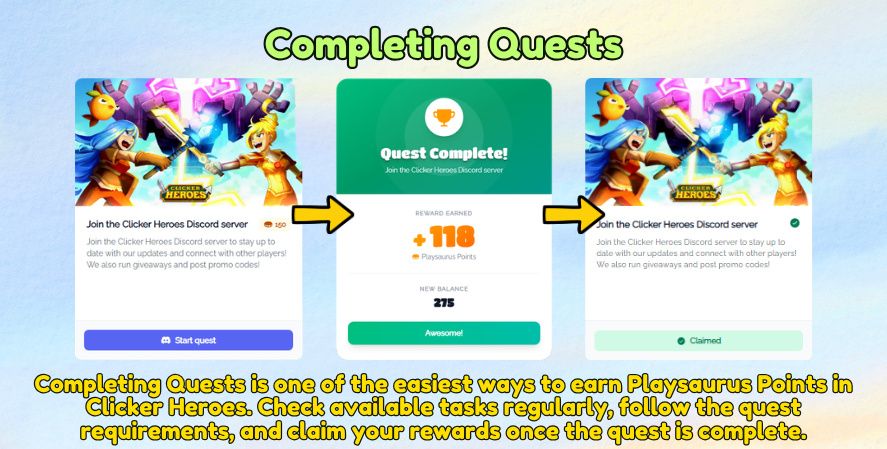
Quest requirements may vary. Some may be quick and simple, while others may require planning or repeated play. Always read the quest description carefully before starting.
Good quest habits include:
- Checking the quest page regularly
- Reading the full requirement
- Confirming the deadline
- Watching for platform restrictions
- Claiming completed rewards when required
Promotional or Community Tasks
Some Playsaurus quests may be connected to community actions or promotional content. For example, players may be asked to join a Discord server, follow a social media page, or watch a game trailer.
These tasks help players stay updated with Playsaurus news while also giving them a way to earn points.
Promotional Campaigns
Players may receive points from promotions that include unique missions, partner deals, official updates, social media activities, or time-limited codes. These campaigns are often time-sensitive and may have specific eligibility rules.
Be careful with unofficial links or suspicious offers. Only use official Playsaurus channels, official game pages, or clearly verified announcements. If a promotion asks for your password outside the official login system, treat it as suspicious.
Purchasing Eligible Content
Some reward systems include points from eligible purchases, but this should never be assumed. If purchases are part of a campaign, the official page should clearly explain what qualifies.
Players interested in video game merchandise, premium content, bundles, or other paid items should check whether the purchase is eligible before buying. Do not purchase something only because you assume it will generate points.
A good rule: if the reward page does not clearly state that a purchase earns points, verify first.
Check the Quest Page Regularly
The Playsaurus Quests page may update when new tasks become available. Instead of daily quests, the current page shows individual quest cards that players can complete to earn points.
Available tasks may include joining official Discord servers, following Playsaurus on social media, or watching official game trailers. Each card explains what to do and may show a claim status once the task is completed.
Since the page does not currently show a daily reset, daily reward, or rotating challenge system, players should not assume new quests appear every day. The best habit is to check the Quests tab regularly and complete any new task cards when they are available.
Watch for New Quest Cards
Playsaurus may update the Quests page with new tasks when there are new games, trailers, community activities, or announcements. Players should review the page regularly to see if new cards have been added.
Understanding Playsaurus Quests
Quests are the heart of the rewards experience. They give structure to the system and tell players exactly what they need to do to qualify for points.
For a game like Clicker Heroes, quests make sense because players are already used to chasing milestones. Whether you are pushing to a higher zone, improving hero efficiency, or planning your next ascension, quest-based goals fit naturally into the experience.
Quests are one of the main ways Playsaurus Points in Clicker Heroes become part of your regular gameplay routine.
Where to Find Quests
Quests are usually found through the Playsaurus Account dashboard, rewards area, or official quest page. Some quests may also be mentioned in-game, on official announcements, or through community posts.
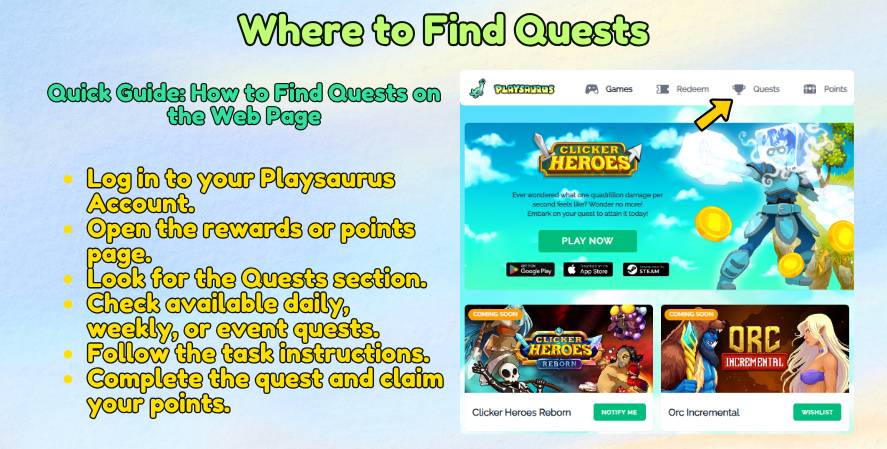
Look for areas labeled quests, rewards, account missions, campaigns, or similar terms. Since page layouts can change, rely on the current official interface rather than older screenshots.
Types of Quests
The Playsaurus Quest page does not currently show separate labels for daily, weekly, or event quests. Instead, quests appear as individual task cards.
These tasks may include actions such as:
- Joining the Mr Mine Discord server
- Joining the Clicker Heroes Discord server
- Following Playsaurus on Instagram
- Following Playsaurus on X
- Watching official game trailers
- Checking upcoming game pages
Each quest card explains what to do. Some cards include a Visit the link or Watch the video button. After completing the task, the card may show a Claimed status.
Because the quest system may change over time, players should check the official Playsaurus Quest page for the latest available tasks.
Quest Completion Tips
The best quest strategy is simple: check early, read carefully, and complete requirements before the deadline.
Here are practical tips:
- Start event quests as soon as they appear.
- Prioritize quests with expiration dates.
- Take note of requirements that need multiple sessions.
- Make sure your account is linked before completing eligible tasks.
- Confirm whether rewards must be manually claimed.
- Keep screenshots if a high-value quest does not register.
A good game strategy is not only about in-game optimization. It also includes knowing when to participate in rewards, when to save points, and when to redeem them.
Common Quest Mistakes
Many quest issues come from small misunderstandings. Players may complete a task before linking their account, miss a claim button, use the wrong platform, or misunderstand the deadline.
Common mistakes include:
- Assuming all gameplay earns points
- Ignoring platform restrictions
- Completing quests while logged out
- Forgetting to claim completed rewards
- Missing event deadlines
- Using outdated codes
- Expecting instant point delivery
Read every quest carefully. It takes less time to verify the requirement than to troubleshoot missing points later.
How to Redeem Playsaurus Points
Once you have collected enough points, the next step is learning how to redeem points. Redemption is where the reward system becomes most exciting because your accumulated activity turns into something tangible, cosmetic, promotional, or useful in-game.
However, available rewards may change. Some items may be limited, seasonal, or available only while supplies last. Always check the current official redemption page before making plans around a specific item.
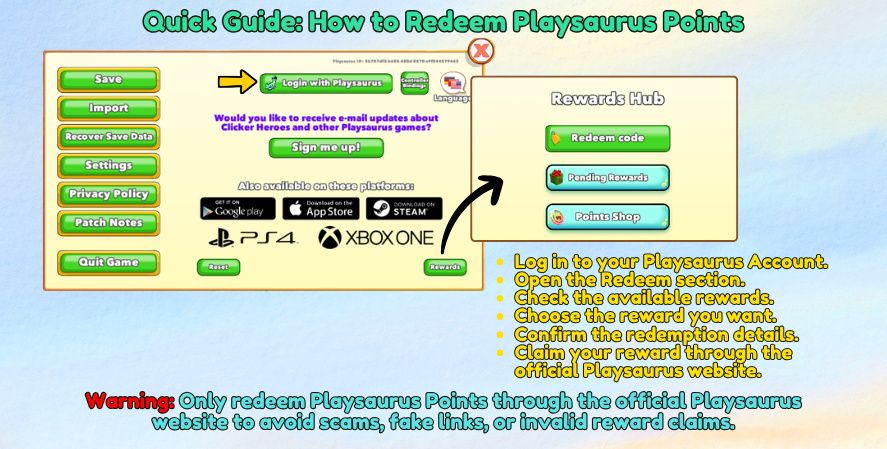
Redeeming Playsaurus Points in Clicker Heroes should always be done through official channels. This helps protect your account and ensures your rewards are applied correctly when they are available.
Visiting the Redemption Portal
The redemption portal is typically part of the official Playsaurus rewards or account system. You may need to log in before viewing your balance, available offers, or reward history.
When visiting the redemption page, confirm that:
- You are logged in to the correct account.
- Your point balance is visible.
- The reward is still available.
- You meet all eligibility rules.
- Your platform supports the reward.
Avoid third-party redemption pages unless they are officially linked by Playsaurus.
Choosing Available Rewards
The available rewards may vary. Some may be in-game items, while others may be cosmetics, codes, promotional items, or community-related rewards.
Before redeeming, compare the value of each option. A small reward may be useful immediately, but a limited-time reward may be harder to get later. Saving points can sometimes be the better choice, especially if the Playsaurus Points Shop rotates items.
Redeeming Codes
Some rewards may be delivered as codes. If you receive a code, copy it exactly and follow the official instructions for where to enter it.
Common code redemption tips:
- Check capitalization and spacing.
- Do not add extra characters.
- Verify the code has not expired.
- Confirm that the code matches your platform.
- Use the code only on official redemption pages or in-game menus.
If a code fails, do not immediately assume it is invalid. It could be a platform mismatch, account issue, temporary delay, or formatting problem.
Receiving Rewards In-Game
After redemption, rewards may appear instantly or after a short delay. Some may require restarting the game, refreshing the account page, checking in-game mail, or syncing your account.
If the reward does not appear, confirm the following:
- You redeemed it on the correct account.
- Your game is linked properly.
- The reward supports your platform.
- You followed all claim instructions.
- The reward is not located in a different menu.
Troubleshooting Redemption Problems
Redemption problems can happen, especially during events when many players are claiming rewards at once. If your redemption does not work, stay calm and document the issue.
Helpful information to collect includes:
- Your account email or user ID
- The reward name
- The code, if applicable
- The time and date of redemption
- Screenshots of errors
- Platform and game version
- Proof of completed quest, if relevant
Then use the official support channel recommended by Playsaurus.
Types of Rewards Available
The exact reward list can change, but rewards generally fall into a few common categories. Rewards can serve different purposes. Some may help with gameplay, others may change appearance, and some may be tied to community events.
Because reward availability is time-sensitive, treat this section as a general guide rather than a promise of current inventory.
In-Game Rewards
In-game rewards may include items, boosts, bonuses, currencies, or other benefits connected to Clicker Heroes or supported games. These rewards are appealing because they directly affect your play experience.
In a progression-focused game, even a small bonus can feel satisfying if it helps you reach the next milestone faster.
Exclusive Cosmetics
Exclusive cosmetics are often highly desirable because they let players show that they participated in a specific event, campaign, or reward program. Cosmetics may not always change power, but they can be valuable to collectors.
For many players, cosmetics are more meaningful than temporary boosts because they can serve as long-term proof of participation.
Promotional Items
Promotional items may be connected to special campaigns, announcements, community milestones, or external offers. These can include digital rewards, codes, or other limited items.
Promotional rewards are often time-limited, so players should pay attention to official posts.
Community Rewards
Community rewards may be tied to group participation, social milestones, developer events, or wider player activity. These rewards help build connection between the developers and the player base.
A strong community can make Clicker Heroes feel more alive, especially for players who enjoy sharing optimization tips, quest reminders, and progress milestones.
Limited-Time Rewards
Limited-time rewards are usually the most urgent. They may appear during events, seasonal campaigns, or special promotions. Once the event ends, the reward may disappear from the catalog.
If you see a limited reward you really want, compare its deadline with your current point balance and decide whether to save or redeem.
Best Ways to Earn Playsaurus Points Faster
The best way to earn Playsaurus Points faster is not necessarily to play nonstop. It is to play consistently, stay informed, and focus on high-value opportunities.
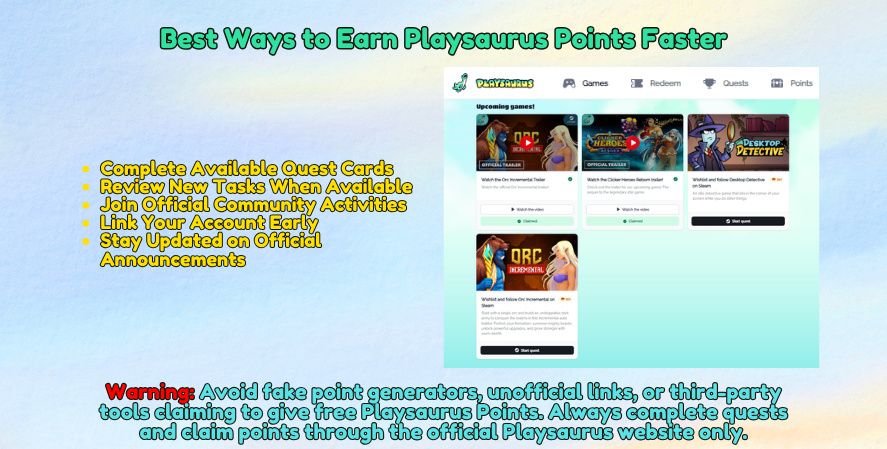
Players who treat quests casually may still collect points, but players who plan around quest resets and events will usually do better.
Complete Available Quest Cards
Instead of daily quests, the current Playsaurus page shows available quest cards. Open each card, read the instructions, complete the required action, and claim the points when the task is finished.
Review New Tasks When Available
The Quests page may change over time. Checking it regularly helps you see whether new tasks have been added, especially when Playsaurus promotes a game, trailer, or community channel.
Join Official Community Activities
Some quests may ask players to join official community spaces, such as Discord servers or social media pages. These tasks can help players stay connected with updates, promo codes, giveaways, and game news.
Link Your Account Early
Linking your account early prevents missed opportunities. If you wait until after completing a task, the system may not retroactively count your progress.
This is especially important for players returning after a long break. Before grinding quests or participating in events, confirm that your Playsaurus Account is active and connected.
Stay Updated on Official Announcements
Official announcements are the best source for new quests, reward changes, code releases, and event details. Community discussions are useful, but official channels should be your final reference.
Follow the official sources that Playsaurus currently uses, such as its website, game pages, community hubs, or social channels.
Common Problems and Solutions
Even well-designed rewards systems can run into issues. Fortunately, many issues players run into are easy to understand and fix.
Before contacting support, check the basics: account login, platform eligibility, quest status, code spelling, and reward availability.
Points Not Appearing
If points do not appear, the most likely causes are delay, account mismatch, incomplete quest requirements, or platform restrictions.
Try these steps:
- Refresh the rewards page.
- Restart the game.
- Make sure you are signed in with the right account.
- Recheck the quest requirement.
- Verify that the quest was still active.
- Wait for any stated processing period.
- Contact support if the problem remains.
Quest Didn’t Register
A quest may fail to register if you completed it while logged out, used the wrong platform, did not link your account, or missed a required claim step.
Check whether the quest says “completed,” “claim,” “pending,” or “expired.” These labels can tell you what happened.
If the quest was high-value, save screenshots before the deadline passes.
Redemption Code Doesn’t Work
A redemption code may fail for several reasons:
- It expired.
- It was already used.
- It was entered incorrectly.
- It is limited to another platform.
- tied to another account.
- The redemption page is temporarily unavailable.
Copy and paste the code when possible. If typing manually, check every character carefully.
Account Sync Issues
Account sync issues can happen when players use multiple devices, multiple accounts, or different versions of the game. This is common in older games and cross-platform communities.
To reduce sync problems:
- Use one primary account.
- Avoid switching login methods.
- Confirm platform support.
- Keep your game updated.
- Do not unlink accounts unless necessary.
- Follow official instructions when changing devices.
Contacting Support
If basic troubleshooting does not work, contact official support. Provide clear details and avoid sending multiple duplicate requests unless instructed.
Include your account information, platform, screenshots, quest name, reward name, and the exact problem. Clear and detailed information can help the support team review your issue faster.
Tips to Maximize Your Rewards
Maximizing rewards is about timing and discipline. You do not need to obsess over every point, but a smart approach can help you get better value from the system.
The main idea is to earn consistently and redeem thoughtfully.
Prioritize High-Value Quests
Not all quests are equal. Some may take only a few minutes and offer a small reward. Others may require more effort but provide more points.
When choosing what to complete first, consider:
- Point value
- Time required
- Expiration date
- Difficulty
- Platform restrictions
- Whether the reward helps you reach a bigger goal
High-value quests should usually come first, especially during events.
Save Points for Limited Offers
It can be tempting to spend points as soon as you have enough, but saving may be smarter. Limited offers may appear later, and you may regret spending your balance too early.
A good approach is to keep a reserve of points whenever possible. That way, you can react quickly when a rare reward appears.
Check the Quest Page Regularly
The best way to find new opportunities is to check the Playsaurus Quests page from time to time. New quest cards may appear when Playsaurus adds new promotions, community tasks, or game-related activities.
Since the page does not currently show a daily reset timer, players should not assume that new quests are added every day.
Follow Official Community Channels
Official community channels can help you catch announcements faster. They may also include reminders, patch notes, event news, and redemption updates.
The community can also help with strategy. Players often share efficient ways to complete quests, avoid mistakes, and understand confusing requirements.
How Playsaurus Points Fit Into Clicker Heroes and Idle Gaming
Clicker Heroes is popular because it turns simple actions into long-term progress. You start with basic clicks. Then you unlock heroes, abilities, upgrades, ascensions, and better strategies. This steady sense of growth is what defines many incremental games.
The points system fits well because it adds another layer of progress outside the main game screen. Instead of only building hero damage, you also build a reward balance. Upgrades still matter, but quests become part of the routine too. Planning your next ascension is important, and so is knowing when to redeem points.
This is why Clicker Heroes still matters to fans of idle clicker games, clicker games online, and idle RPG systems. It is easy to understand, but it also gives players enough depth to think about better ways to progress.
Players searching for an idle hero clicker game often want this type of experience. They want heroes, upgrades, automatic progress, and rewarding milestones. Players comparing idle rpg game options, idle rpg games pc, or the best idle rpg games may also find Clicker Heroes appealing. It blends RPG-style hero growth with idle game mechanics.
For anyone exploring free idle clicker games, Clicker Heroes is still a strong reference point. It helped shape what many players expect from the genre: fast early progress, satisfying upgrades, prestige systems, and long-term goals.
For new and returning players, Playsaurus Points in Clicker Heroes can make the game feel more rewarding over time. The system gives you another reason to stay active, follow quests, and check for limited-time rewards.
Frequently Asked Questions
Yes, Playsaurus Points can be earned for free through available quests on the Playsaurus website. Based on the current Quests page, tasks may include joining official Discord servers, following Playsaurus on social media, or watching official game trailers.
Log in to your Playsaurus Account and open the Quests tab. You will see available quest cards with instructions. Choose a task, follow the steps, then claim the points once the task is complete.
At the moment, the visible Playsaurus Quests page appears to focus on website-based tasks, not normal Clicker Heroes gameplay progress. Players should read each quest card carefully to see what action is required.
The Quests page does not clearly show point expiration details in the screenshot provided. Check the official Playsaurus account, points, or rewards pages for the latest rules about expiration.
There is no visible transfer option shown in the provided Quests page screenshot. It is safest to treat Playsaurus Points as tied to the account that earned them unless Playsaurus states otherwise.
Make sure you are logged in to the correct Playsaurus Account. Then check whether the quest card shows as completed or claimed. Some tasks may take time to update, especially if they require visiting an outside link or completing an action on another platform.
Based on the current quest examples, purchases do not appear to be required. The visible tasks are free actions such as joining communities, following social pages, or watching videos. Always check each quest card for its exact instructions.
Final Thoughts
Playsaurus Points in Clicker Heroes are best understood through the Playsaurus website, especially the Quests tab. Based on the current page, players can earn points by completing simple task cards, such as joining official communities, following Playsaurus on social media, or watching game trailers.
The system is not currently shown as daily, weekly, or event-based. Instead, the available quests appear as individual cards with clear instructions and claim buttons. Because the page may change over time, players should check it regularly for new tasks.
To make the most of Playsaurus Points in Clicker Heroes, create a Playsaurus Account, visit the Quests page, complete available tasks, and use the Redeem section when rewards are available. This keeps the process simple: log in, complete quests, claim points, and redeem rewards through the official Playsaurus website.